> ## Documentation Index
> Fetch the complete documentation index at: https://docs.crazygoldfish.com/llms.txt
> Use this file to discover all available pages before exploring further.
# Features
> AI-powered classroom observation and coaching system with rubric-based feedback, teacher growth support, parent engagement reports, and leadership dashboards.
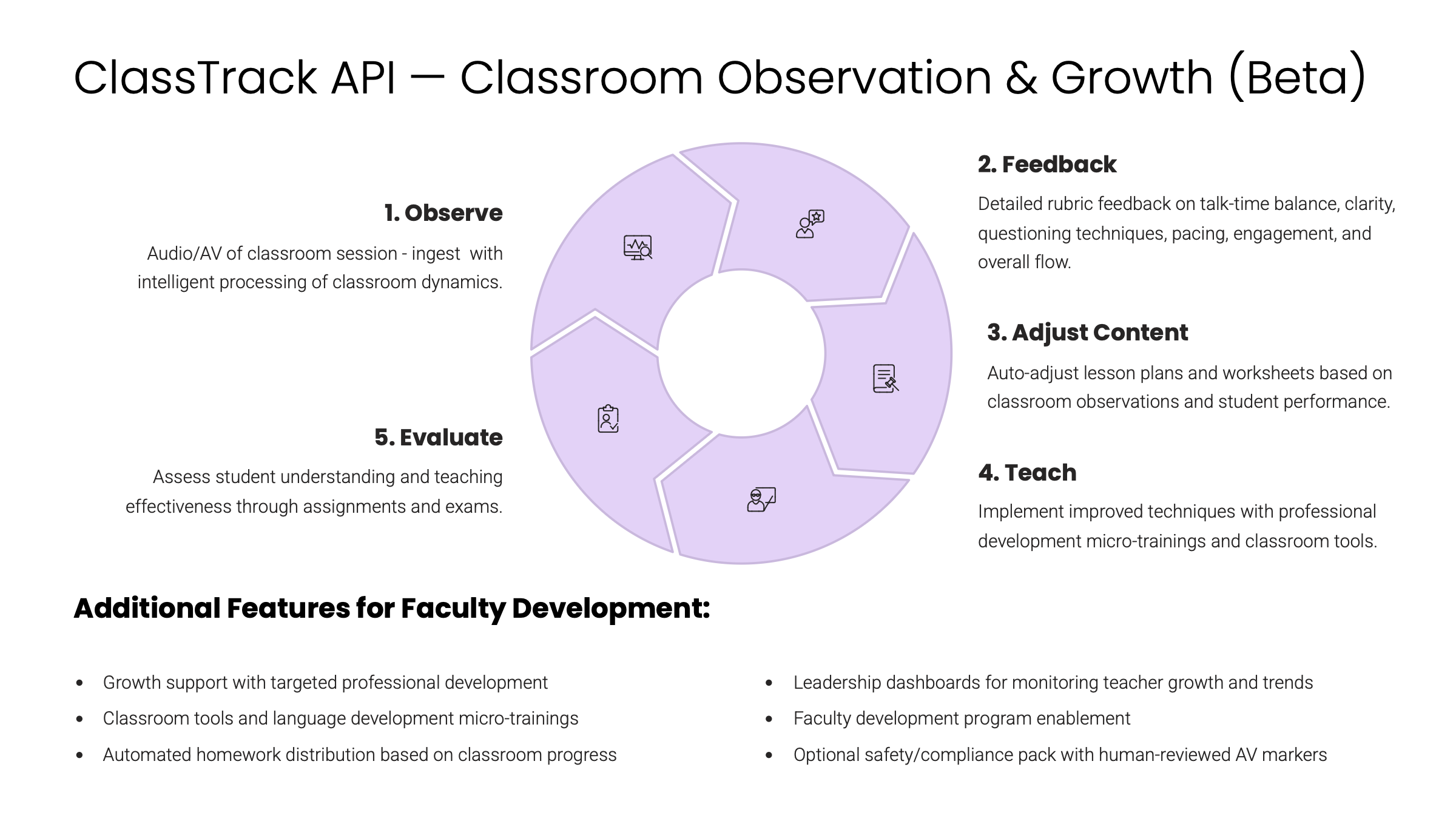
The **ClassTrack Suite** is the **Observation & Coaching Layer** of CrazyGoldFish’s AI reasoning stack. It captures classroom signals, applies **rubric-based evaluation**, and generates insights for **teachers, principals, leaders, and parents**.
***
## Core Capabilities
* **AI-Powered Classroom Observation**
* Audio session ingestion with speech-to-text + speaker ID.
* Engagement analysis (talk-time balance, sentiment, pacing, questioning).
* **Rubric-Based Evaluation**
* Automatic scoring across dimensions: pedagogy, classroom management, student engagement.
* Supports custom rubrics for schools and boards.
* **Teacher Growth Support**
* Actionable feedback linked to micro-trainings.
* Peer observation journals and reflection tools for continuous growth.
* **Parent Engagement Reports**
* Weekly summaries with student engagement highlights and activity snapshots.
* Simple visual reports designed for accessibility.
* **Leadership Dashboards**
* Principals and admins see aggregated insights: observation volume, teacher growth, engagement trends.
* Export-ready for compliance and audits.
 ***
## Supported Inputs
* ✅ Classroom audio recordings
* ✅ Live or uploaded session logs
* ✅ Rubric configurations (default + custom)
* ✅ Teacher/Student/Parent metadata
***
## Stakeholder Value
* **Teachers** → Get structured feedback + growth resources.
* **Students** → Indirectly benefit from improved pedagogy and engagement.
* **Principals** → Monitor teacher effectiveness across classrooms.
* **Parents** → Receive simple reports that build trust and visibility.
* **School Leaders/Admins** → Gain data-driven insights for governance and decision-making.
***
## Ecosystem Integration
* **Upstream:** Lesson Plans + Worksheets feed into observed sessions.
* **Core:** ClassTrack analyses classroom interactions and generates feedback.
* **Downstream:**
* Feeds teacher insights into **Teacher Action Plans**.
* Informs **AI Studio** to adjust lesson plans and worksheets.
* Closes the loop with **Evaluation Layer** by refining assessment strategies.
***
## Next Step
**Next →** Explore the [Workflow](/products/classroom-observation/workflow) to see how ClassTrack captures, processes, and delivers observation insights.
## FAQ
ClassTrack processes classroom audio/video with speech-to-text, speaker ID, and engagement analytics to quantify talk-time balance, questioning frequency, and pacing. These signals align to rubrics for coaching and can feed downstream improvements to materials, while keeping a human-in-the-loop step for teacher review before publishing.
Observation ingests audio/video alongside text artifacts and applies speech-to-text and speaker identification to extract engagement metrics. Outputs include rubric-aligned summaries, annotations, and engagement analytics (talk-time, questioning, pacing) that are export-ready for LMS/ERPs and CBSE/ICSE/GDPR aligned reporting.
Educators review suggested observations and rubric-aligned feedback, make edits, trigger rechecks, and approve outcomes with audit logs. This preserves agency while targeting up to 95% accuracy, ensuring observation insights are trustworthy and instruction-ready before they appear in dashboards or reports.
You can integrate via standard REST APIs for deep control or use a white-label embeddable UI for rapid rollout—both support 24h integration. Teams typically wire sandbox keys, map IDs and branding, and enable webhooks for automation; no AI team is required to launch or maintain the workflow.
Observation completes the Evaluate → Personalize → Generate → Observe loop by sending engagement signals back to refine rubrics and materials. Insights update reteach strategies and AI Studio–generated lesson plans/worksheets, helping teachers act on evidence quickly with CBSE/ICSE/GDPR aligned outputs.
Leaders get compliance-ready dashboards showing observation volume, growth, and trends, backed by audit logs and role-based access. Workflows are CBSE/ICSE/GDPR aligned out of the box, so institutions can monitor usage, support inspections, and maintain privacy-by-design governance.
Accuracy targets are supported by rubric/model-aligned scoring combined with multimodal signals like speech-to-text, speaker ID, and engagement analytics. Human-in-the-loop safeguards and calibration tools allow teachers to review, edit, and re-evaluate observations with auditability to sustain fairness and consistency.
Data flows follow privacy-by-design practices with secure handling and role-based access, and all outputs are CBSE/ICSE/GDPR aligned. Human-in-the-loop review plus audit trails provide transparent oversight so institutions can meet board and regional expectations during observation and reporting.
Observation results are export-ready, including rubric-aligned summaries, annotations, and engagement metrics that sync to LMS/ERPs. APIs and webhooks support automated publishing and downstream analytics, keeping datasets consistent with the rest of the evaluation stack.
Yes—no AI team is required. Use the embeddable, white-label UI to match brand colors and layouts or opt for APIs for deeper control; configure role-based access and review gates so teachers stay in charge while leaders retain compliant, audit-ready visibility.
***
## Supported Inputs
* ✅ Classroom audio recordings
* ✅ Live or uploaded session logs
* ✅ Rubric configurations (default + custom)
* ✅ Teacher/Student/Parent metadata
***
## Stakeholder Value
* **Teachers** → Get structured feedback + growth resources.
* **Students** → Indirectly benefit from improved pedagogy and engagement.
* **Principals** → Monitor teacher effectiveness across classrooms.
* **Parents** → Receive simple reports that build trust and visibility.
* **School Leaders/Admins** → Gain data-driven insights for governance and decision-making.
***
## Ecosystem Integration
* **Upstream:** Lesson Plans + Worksheets feed into observed sessions.
* **Core:** ClassTrack analyses classroom interactions and generates feedback.
* **Downstream:**
* Feeds teacher insights into **Teacher Action Plans**.
* Informs **AI Studio** to adjust lesson plans and worksheets.
* Closes the loop with **Evaluation Layer** by refining assessment strategies.
***
## Next Step
**Next →** Explore the [Workflow](/products/classroom-observation/workflow) to see how ClassTrack captures, processes, and delivers observation insights.
## FAQ
ClassTrack processes classroom audio/video with speech-to-text, speaker ID, and engagement analytics to quantify talk-time balance, questioning frequency, and pacing. These signals align to rubrics for coaching and can feed downstream improvements to materials, while keeping a human-in-the-loop step for teacher review before publishing.
Observation ingests audio/video alongside text artifacts and applies speech-to-text and speaker identification to extract engagement metrics. Outputs include rubric-aligned summaries, annotations, and engagement analytics (talk-time, questioning, pacing) that are export-ready for LMS/ERPs and CBSE/ICSE/GDPR aligned reporting.
Educators review suggested observations and rubric-aligned feedback, make edits, trigger rechecks, and approve outcomes with audit logs. This preserves agency while targeting up to 95% accuracy, ensuring observation insights are trustworthy and instruction-ready before they appear in dashboards or reports.
You can integrate via standard REST APIs for deep control or use a white-label embeddable UI for rapid rollout—both support 24h integration. Teams typically wire sandbox keys, map IDs and branding, and enable webhooks for automation; no AI team is required to launch or maintain the workflow.
Observation completes the Evaluate → Personalize → Generate → Observe loop by sending engagement signals back to refine rubrics and materials. Insights update reteach strategies and AI Studio–generated lesson plans/worksheets, helping teachers act on evidence quickly with CBSE/ICSE/GDPR aligned outputs.
Leaders get compliance-ready dashboards showing observation volume, growth, and trends, backed by audit logs and role-based access. Workflows are CBSE/ICSE/GDPR aligned out of the box, so institutions can monitor usage, support inspections, and maintain privacy-by-design governance.
Accuracy targets are supported by rubric/model-aligned scoring combined with multimodal signals like speech-to-text, speaker ID, and engagement analytics. Human-in-the-loop safeguards and calibration tools allow teachers to review, edit, and re-evaluate observations with auditability to sustain fairness and consistency.
Data flows follow privacy-by-design practices with secure handling and role-based access, and all outputs are CBSE/ICSE/GDPR aligned. Human-in-the-loop review plus audit trails provide transparent oversight so institutions can meet board and regional expectations during observation and reporting.
Observation results are export-ready, including rubric-aligned summaries, annotations, and engagement metrics that sync to LMS/ERPs. APIs and webhooks support automated publishing and downstream analytics, keeping datasets consistent with the rest of the evaluation stack.
Yes—no AI team is required. Use the embeddable, white-label UI to match brand colors and layouts or opt for APIs for deeper control; configure role-based access and review gates so teachers stay in charge while leaders retain compliant, audit-ready visibility.