Generate a link to a ready-made screen where one student uploads their answer sheet for an exam and sees the marks when marking finishes.
The answer sheet upload link is a hosted screen for one student and one exam. You ask the API for a link, give the link to the student, and they upload their answer sheet on it. You do not have to build an upload page, handle files, or show the results.It only covers the student’s side of exam evaluation. The exam and its model answers still have to be set up through the API first.
You send the exam ID and your own student ID. You can also pass the student’s name and your own institute, teacher, and parent IDs, which are stored against the answer sheet so you can find it again.You get back a link and the values you sent. Behind the scenes, the API creates a new, empty answer sheet for that student, and the link points at it.
You send
Required
Exam ID
Yes
Your student ID
Yes
Student name
No
Your institute ID, teacher ID, parent ID
No
Each call creates a new answer sheet, so each call gives you a different link. Ask for one link per attempt, not one link you reuse.
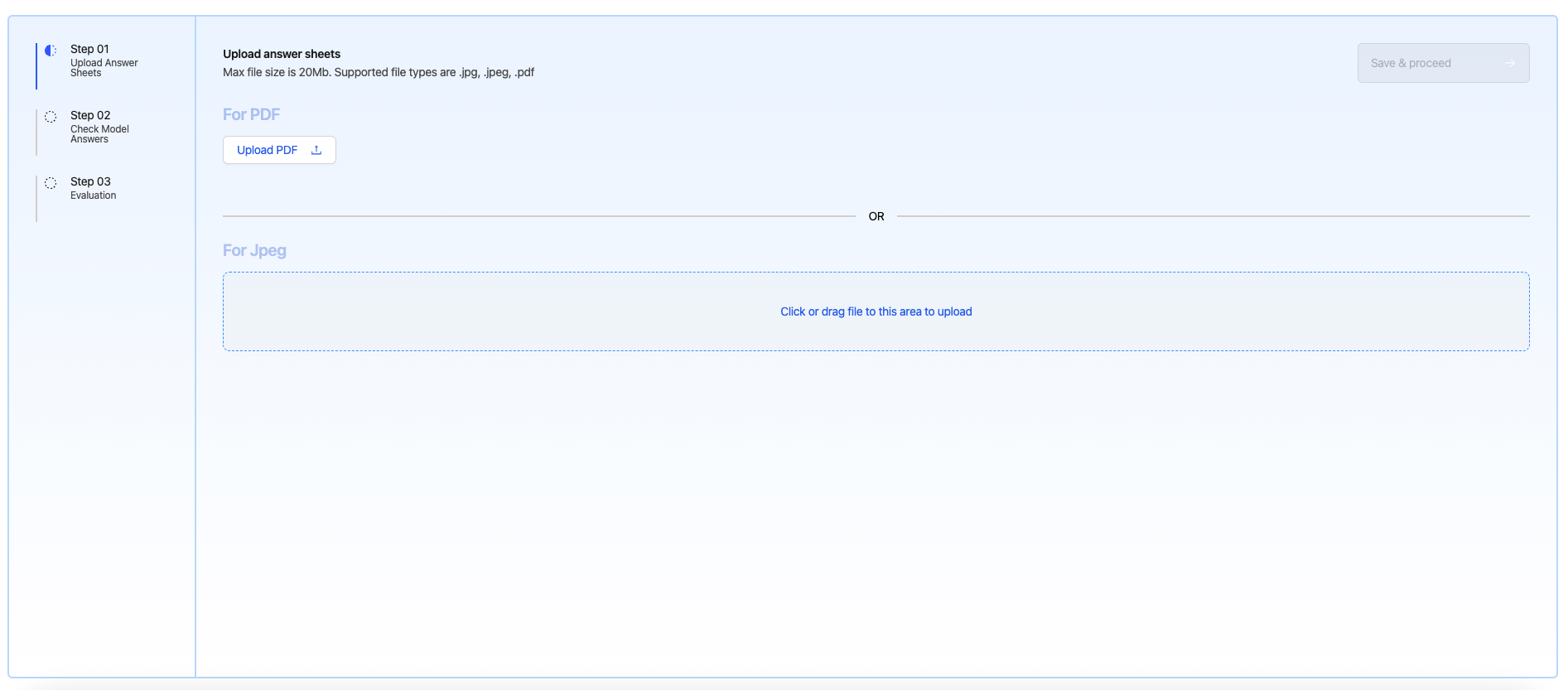
The student uploads a PDF or photographs of their handwritten pages. They can upload several images for a multi-page answer, or one PDF, or give a link to a PDF.
Answer sheet upload
2
Check the model answers while it marks
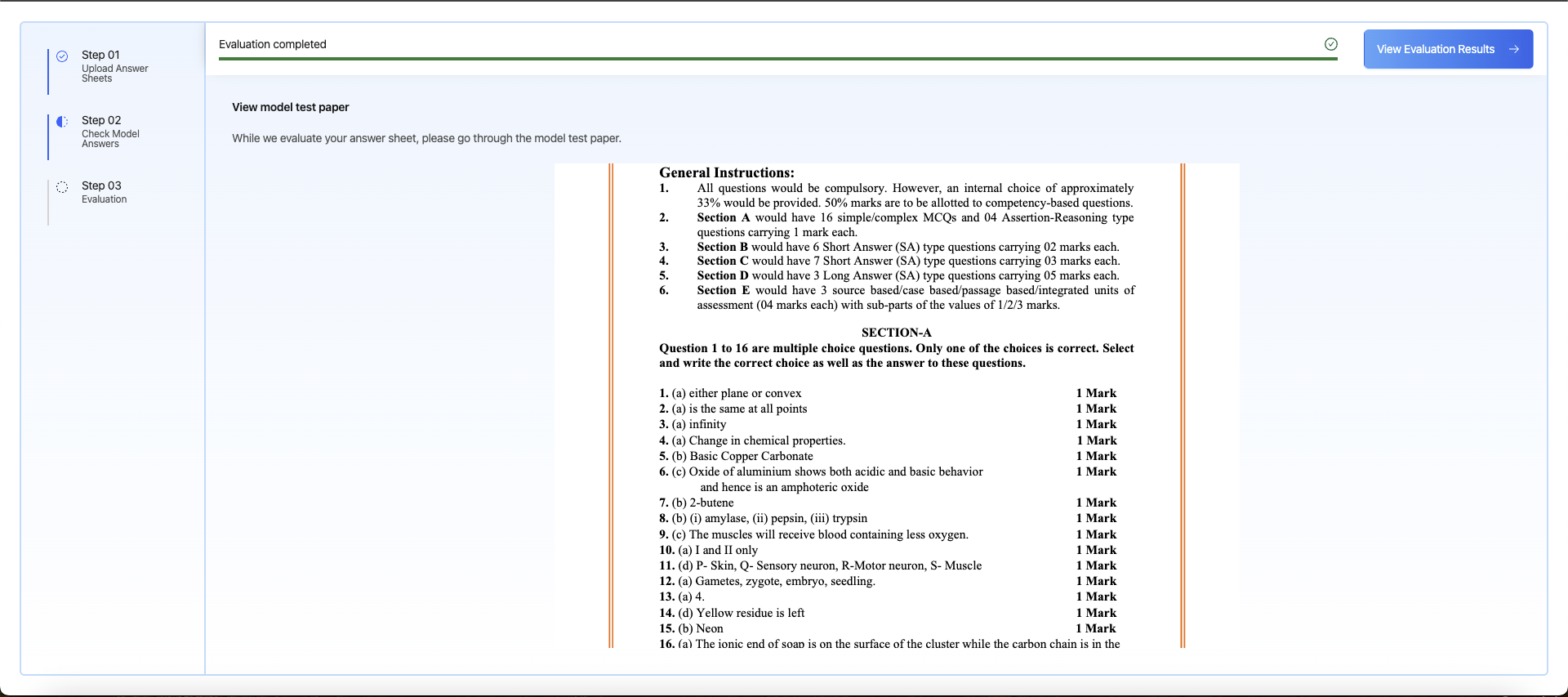
The AI reads the handwriting and scores each answer against the model answers for that exam. While it works, the screen shows the model answer paper, so the student can already compare what they wrote.
Model answer paper shown during marking
3
See the marks and the feedback
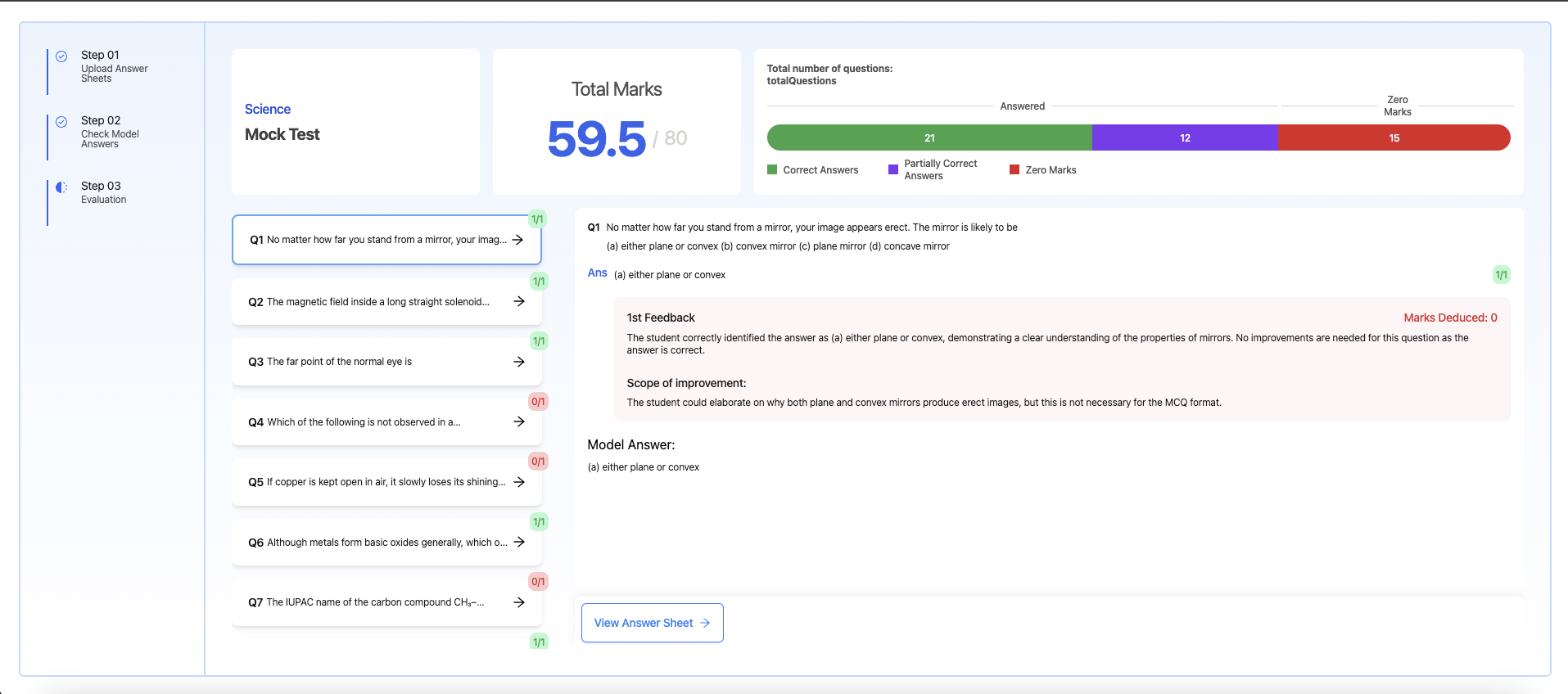
The screen shows the total, how many answers were fully correct, partly correct, and scored zero, and then each question with its marks, the model answer, the marks deducted, and what to improve. The student can also open the answer sheet they uploaded.
Marking finished
This screen does not wait for publishing. It shows the marks and the feedback as soon as marking finishes, before anyone has reviewed or published anything. If your process needs a teacher to check the marks before the student sees them, do not give the student this link: build your own upload page against the API and release the result yourself. See how publishing really works.
You want students uploading their own sheets quickly, you do not want to handle file uploads, and you are happy for the student to see the marks straight away.
Use the API
You need the upload and the results inside your own screens, or you need a teacher to check and correct marks before the student sees them. The link does not hold results back, so this is the only way to get a review step.
You can use both. The link is just another way to fill an answer sheet, so a sheet uploaded through the link is readable through the API like any other, and a teacher can still correct its marks.
The API returns a normal HTTPS web address, so you can open it in a new tab, a web view, or an iframe, whichever suits your app. Test the iframe case before you rely on it.
Can I change the colors and logo on the screen?
No. The screen is fixed. If you need it to match your product, build your own upload page against the API instead.
Does the link expire?
It stays valid while the answer sheet exists, and it stops being useful once that sheet has been marked, because an answer sheet cannot be uploaded to twice. Treat each link as single use and create a new one for the next attempt.
Is the link private?
It contains the exam ID and the answer sheet ID, and anyone who has it can open that one screen. Send it only to the student it belongs to, and do not put it anywhere public.
Do I need the exam and model answers ready first?
Yes. Create the exam, upload the question paper, and upload and process the model answers before you generate a link. Without model answers there is nothing to mark the student against.
The full flow from question paper to published result.
Developer guide
Set up an exam and its model answers with the API.
All APIs
Every endpoint in one place.
Was this page helpful?
⌘I
{"docsConfig":{"theme":"maple","$schema":"https://mintlify.com/docs.json","name":"CrazyGoldFish","description":"Documentation for CrazyGoldFish, the AI layer for K-12 education. Learn how to evaluate exams and assignments with AI, create student and teacher action plans, generate lesson plans and worksheets, and analyze classroom teaching, with APIs you can add to your own platform.","colors":{"primary":"#7C3AED","light":"#826FF0","dark":"#6F5FE6"},"logo":{"light":"https://mintcdn.com/cfg/7jbUDteLtpeYR48G/logo/cgf_big.svg?fit=max\u0026auto=format\u0026n=7jbUDteLtpeYR48G\u0026q=85\u0026s=d838d9ad30168fc13de5504f0aa82195","dark":"https://mintcdn.com/cfg/7jbUDteLtpeYR48G/logo/cgf_big.svg?fit=max\u0026auto=format\u0026n=7jbUDteLtpeYR48G\u0026q=85\u0026s=d838d9ad30168fc13de5504f0aa82195"},"favicon":"https://mintcdn.com/cfg/aq0OgAqLh4y-jTij/logo/cgf.png?fit=max\u0026auto=format\u0026n=aq0OgAqLh4y-jTij\u0026q=85\u0026s=9f8c973cdd80cb44d00d51ca8c6168cb","api":{"playground":{"display":"interactive"},"examples":{"defaults":"required","languages":["curl","python","javascript"],"prefill":true}},"navbar":{"primary":{"type":"button","label":"Contact Us","href":"https://www.crazygoldfish.com/#comp-lxumousa"}},"footer":{"socials":{"website":"https://www.crazygoldfish.com/","linkedin":"https://www.linkedin.com/company/crazygoldfish"}},"seo":{"metatags":{"msvalidate.01":"B085065085904940FB731D72667A3C71","og:site_name":"CrazyGoldFish Docs","twitter:site":"@crazygoldfish"},"organization":{"id":"https://www.crazygoldfish.com/#organization","name":"CrazyGoldFish","url":"https://www.crazygoldfish.com","sameAs":["https://www.linkedin.com/company/crazygoldfish"]},"indexing":"navigable"},"fonts":{"family":"Ubuntu"},"styling":{"eyebrows":"breadcrumbs","latex":false},"integrations":{"ga4":{"measurementId":"G-ZPKMMFBKRR"},"hotjar":{"hjid":"5030771","hjsv":"6"}},"navigation":{"pages":[]}},"deployment":{"deploymentMetadataValue":{"subdomain":"cfg","hasAudioNarration":false,"actualSubdomain":"cfg","customDomains":["docs.crazygoldfish.com"],"gitSource":{"type":"github","owner":"techcrazygoldfish","repo":"mintlify","deployBranch":"main","contentDirectory":"docs","isPrivate":false,"mountPath":"","label":""},"chroma":{"liveDeploymentHistoryId":"6ae4b56f812f7e980ce5bec6","collectionId":"39db4210-b33b-44c2-aed5-e395a6c4b7cd","schemaVersion":"v3","latestBuiltDeploymentHistoryId":"6ae4b56f812f7e980ce5bec6"},"feedback":{"thumbs":true,"edits":false,"issues":false},"entitlements":{},"buildId":"6ae4b56f812f7e980ce5bec6","clientVersion":"0.0.4044","searchFilterCounts":[{"language":"default","tag":"API Reference","count":91},{"language":"default","tag":"Documentation","count":36},{"language":"default","tag":"Exam Evaluation","count":23},{"language":"default","tag":"Assignment Evaluation","count":14},{"language":"default","tag":"Lesson Plan Builder","count":14},{"language":"default","tag":"Worksheet Builder","count":13},{"language":"default","tag":"Personalization Layer","count":10},{"language":"default","tag":"Model answers","count":8},{"language":"default","tag":"Answer sheets","count":8},{"language":"default","tag":"Evaluation Layer","count":8}]},"assistantConfig":{},"basePath":"","hasChatPermissions":false,"hasWebMcpPermissions":false,"toggles":[{"name":"kill-isr","enabled":true,"variant":{"name":"disabled","enabled":false,"feature_enabled":true},"impressionData":false},{"name":"agent-mintlify-slack","enabled":true,"variant":{"name":"disabled","enabled":false,"feature_enabled":true},"impressionData":false},{"name":"agent-integrations-settings","enabled":true,"variant":{"name":"disabled","enabled":false,"feature_enabled":true},"impressionData":false},{"name":"automations-pr-grouping","enabled":true,"variant":{"name":"disabled","enabled":false,"feature_enabled":true},"impressionData":false},{"name":"custom-prefix","enabled":true,"variant":{"name":"disabled","enabled":false,"feature_enabled":true},"impressionData":false},{"name":"analytics-v7","enabled":true,"variant":{"name":"disabled","enabled":false,"feature_enabled":true},"impressionData":false},{"name":"user-flows-analytics","enabled":true,"variant":{"name":"disabled","enabled":false,"feature_enabled":true},"impressionData":false},{"name":"no-publish-flow","enabled":true,"variant":{"name":"disabled","enabled":false,"feature_enabled":true},"impressionData":false},{"name":"workos-onboarding","enabled":true,"variant":{"name":"disabled","enabled":false,"feature_enabled":true},"impressionData":false},{"name":"llms-txt-v2","enabled":true,"variant":{"name":"disabled","enabled":false,"feature_enabled":true},"impressionData":false},{"name":"snapshot-serving-live","enabled":true,"variant":{"name":"disabled","enabled":false,"feature_enabled":true},"impressionData":false},{"name":"stripTemperatureMiddleware","enabled":true,"variant":{"name":"disabled","enabled":false,"feature_enabled":true},"impressionData":false},{"name":"support-platform-pylon-zendesk","enabled":true,"variant":{"name":"disabled","enabled":false,"feature_enabled":true},"impressionData":false},{"name":"snapshot-serving","enabled":true,"variant":{"name":"disabled","enabled":false,"feature_enabled":true},"impressionData":false},{"name":"instant-rollback","enabled":true,"variant":{"name":"disabled","enabled":false,"feature_enabled":true},"impressionData":false},{"name":"granular-notifications-server","enabled":true,"variant":{"name":"disabled","enabled":false,"feature_enabled":true},"impressionData":false},{"name":"granular-notifications","enabled":true,"variant":{"name":"disabled","enabled":false,"feature_enabled":true},"impressionData":false},{"name":"automations-fable","enabled":true,"variant":{"name":"disabled","enabled":false,"feature_enabled":true},"impressionData":false},{"name":"fixed-ai-action-pricing","enabled":true,"variant":{"name":"disabled","enabled":false,"feature_enabled":true},"impressionData":false},{"name":"automation-resolve-merge-conflict","enabled":true,"variant":{"name":"disabled","enabled":false,"feature_enabled":true},"impressionData":false},{"name":"scoped-publishing","enabled":true,"variant":{"name":"disabled","enabled":false,"feature_enabled":true},"impressionData":false},{"name":"mintql","enabled":true,"variant":{"name":"disabled","enabled":false,"feature_enabled":true},"impressionData":false},{"name":"page-level-analytics","enabled":true,"variant":{"name":"disabled","enabled":false,"feature_enabled":true},"impressionData":false},{"name":"editor-version-history-v2","enabled":true,"variant":{"name":"disabled","enabled":false,"feature_enabled":true},"impressionData":false},{"name":"billing-page-v2","enabled":true,"variant":{"name":"disabled","enabled":false,"feature_enabled":true},"impressionData":false},{"name":"full-page-search","enabled":true,"variant":{"name":"disabled","enabled":false,"feature_enabled":true},"impressionData":false},{"name":"workspace-projects","enabled":true,"variant":{"name":"disabled","enabled":false,"feature_enabled":true},"impressionData":false},{"name":"assistant-v5","enabled":true,"variant":{"name":"disabled","enabled":false,"feature_enabled":true},"impressionData":false},{"name":"byok-sep-25","enabled":true,"variant":{"name":"disabled","enabled":false,"feature_enabled":true},"impressionData":false},{"name":"fork-pr-previews","enabled":true,"variant":{"name":"disabled","enabled":false,"feature_enabled":true},"impressionData":false},{"name":"revalidation-jwt","enabled":true,"variant":{"name":"disabled","enabled":false,"feature_enabled":true},"impressionData":false},{"name":"vite-origin","enabled":true,"variant":{"name":"disabled","enabled":false,"feature_enabled":true},"impressionData":false},{"name":"billing-updated-9-15","enabled":true,"variant":{"name":"disabled","enabled":false,"feature_enabled":true},"impressionData":false},{"name":"workos-sso-scim","enabled":true,"variant":{"name":"disabled","enabled":false,"feature_enabled":true},"impressionData":false},{"name":"hobby-abuse-scan","enabled":true,"variant":{"name":"disabled","enabled":false,"feature_enabled":true},"impressionData":false},{"name":"dashboard-inbox","enabled":true,"variant":{"name":"disabled","enabled":false,"feature_enabled":true},"impressionData":false},{"name":"workos-signup","enabled":true,"variant":{"name":"disabled","enabled":false,"feature_enabled":true},"impressionData":false},{"name":"turbopuffer-dual-write","enabled":true,"variant":{"name":"disabled","enabled":false,"feature_enabled":true},"impressionData":false},{"name":"workos-enabled","enabled":true,"variant":{"name":"disabled","enabled":false,"feature_enabled":true},"impressionData":false},{"name":"approve-review-flow","enabled":true,"variant":{"name":"disabled","enabled":false,"feature_enabled":true},"impressionData":false},{"name":"sso-setup-deadline-banner","enabled":true,"variant":{"name":"disabled","enabled":false,"feature_enabled":true},"impressionData":false}],"googleFontsInlined":true},"customCss":[],"page":{"pagePath":"products/evaluation-layer/embeddable-ui","slug":"/products/evaluation-layer/embeddable-ui","pageMetadata":{"title":"Answer Sheet Upload Link","sidebarTitle":"Embeddable UI","description":"Generate a link to a ready-made screen where one student uploads their answer sheet for an exam and sees the marks when marking finishes.","keywords":["answer sheet upload link","student answer sheet upload","exam evaluation upload page","hosted upload screen"],"href":"/products/evaluation-layer/embeddable-ui"},"description":{"compiledSource":"\"use strict\";\nconst {jsx: _jsx} = arguments[0];\nconst {useMDXComponents: _provideComponents} = arguments[0];\nfunction _createMdxContent(props) {\n const _components = {\n p: \"p\",\n ..._provideComponents(),\n ...props.components\n };\n return _jsx(_components.p, {\n children: \"Generate a link to a ready-made screen where one student uploads their answer sheet for an exam and sees the marks when marking finishes.\"\n });\n}\nfunction MDXContent(props = {}) {\n const {wrapper: MDXLayout} = {\n ..._provideComponents(),\n ...props.components\n };\n return MDXLayout ? _jsx(MDXLayout, {\n ...props,\n children: _jsx(_createMdxContent, {\n ...props\n })\n }) : _createMdxContent(props);\n}\nreturn {\n default: MDXContent\n};\n","frontmatter":{},"scope":{}},"pageType":"default","mdx":{"mdxSource":{"compiledSource":"\"use strict\";const{Fragment:_Fragment,jsx:_jsx,jsxs:_jsxs}=arguments[0];const{useMDXComponents:_provideComponents}=arguments[0];function _createMdxContent(props){const _components={a:`a`,p:`p`,strong:`strong`,tbody:`tbody`,td:`td`,th:`th`,thead:`thead`,tr:`tr`,..._provideComponents(),...props.components},{Accordion,AccordionGroup,Card,CardGroup,Frame,Heading,OptimizedImage,Step,Steps,Table,Warning}=_components;if(!Accordion)_missingMdxReference(`Accordion`,true);if(!AccordionGroup)_missingMdxReference(`AccordionGroup`,true);if(!Card)_missingMdxReference(`Card`,true);if(!CardGroup)_missingMdxReference(`CardGroup`,true);if(!Frame)_missingMdxReference(`Frame`,true);if(!Heading)_missingMdxReference(`Heading`,true);if(!OptimizedImage)_missingMdxReference(`OptimizedImage`,true);if(!Step)_missingMdxReference(`Step`,true);if(!Steps)_missingMdxReference(`Steps`,true);if(!Table)_missingMdxReference(`Table`,true);if(!Warning)_missingMdxReference(`Warning`,true);return _jsxs(_Fragment,{children:[_jsx(_components.p,{children:`The answer sheet upload link is a hosted screen for one student and one exam. You ask the API for a link, give the link to the student, and they upload their answer sheet on it. You do not have to build an upload page, handle files, or show the results.`}),`\n`,_jsx(_components.p,{children:`It only covers the student’s side of exam evaluation. The exam and its model answers still have to be set up through the API first.`}),`\n`,_jsx(Heading,{level:`2`,id:`what-do-i-send-and-what-do-i-get-back`,children:`What do I send, and what do I get back?`}),`\n`,_jsx(_components.p,{children:`You send the exam ID and your own student ID. You can also pass the student’s name and your own institute, teacher, and parent IDs, which are stored against the answer sheet so you can find it again.`}),`\n`,_jsx(_components.p,{children:`You get back a link and the values you sent. Behind the scenes, the API creates a new, empty answer sheet for that student, and the link points at it.`}),`\n`,_jsxs(Table,{children:[_jsx(_components.thead,{children:_jsxs(_components.tr,{children:[_jsx(_components.th,{children:`You send`}),_jsx(_components.th,{children:`Required`})]})}),_jsxs(_components.tbody,{children:[_jsxs(_components.tr,{children:[_jsx(_components.td,{children:`Exam ID`}),_jsx(_components.td,{children:`Yes`})]}),_jsxs(_components.tr,{children:[_jsx(_components.td,{children:`Your student ID`}),_jsx(_components.td,{children:`Yes`})]}),_jsxs(_components.tr,{children:[_jsx(_components.td,{children:`Student name`}),_jsx(_components.td,{children:`No`})]}),_jsxs(_components.tr,{children:[_jsx(_components.td,{children:`Your institute ID, teacher ID, parent ID`}),_jsx(_components.td,{children:`No`})]})]})]}),`\n`,_jsx(_components.p,{children:`Each call creates a new answer sheet, so each call gives you a different link. Ask for one link per attempt, not one link you reuse.`}),`\n`,_jsx(Heading,{level:`2`,id:`what-does-the-student-do-on-the-screen`,children:`What does the student do on the screen?`}),`\n`,_jsxs(Steps,{children:[_jsxs(Step,{title:`Upload the answer sheet`,children:[_jsx(_components.p,{children:`The student uploads a PDF or photographs of their handwritten pages. They can upload several images for a multi-page answer, or one PDF, or give a link to a PDF.`}),_jsx(Frame,{caption:`Answer sheet upload`,children:_jsx(OptimizedImage,{src:`https://mintcdn.com/cfg/aq0OgAqLh4y-jTij/images/ans-sheet-upload.png?fit=max\u0026auto=format\u0026n=aq0OgAqLh4y-jTij\u0026q=85\u0026s=a2e0fbdf45f63aeac3e1d8d33f901dc4`,alt:`Hosted upload screen for a handwritten answer sheet`,\"data-og-width\":`1893`,width:`1893`,\"data-og-height\":`833`,height:`833`,\"data-path\":`images/ans-sheet-upload.png`,\"data-optimize\":`true`,\"data-opv\":`3`,srcset:`https://mintcdn.com/cfg/aq0OgAqLh4y-jTij/images/ans-sheet-upload.png?w=280\u0026fit=max\u0026auto=format\u0026n=aq0OgAqLh4y-jTij\u0026q=85\u0026s=1e603fed4ab1ee8698359087f1381816 280w, https://mintcdn.com/cfg/aq0OgAqLh4y-jTij/images/ans-sheet-upload.png?w=560\u0026fit=max\u0026auto=format\u0026n=aq0OgAqLh4y-jTij\u0026q=85\u0026s=4005d94468d1f79d5f24a0d6121b5181 560w, https://mintcdn.com/cfg/aq0OgAqLh4y-jTij/images/ans-sheet-upload.png?w=840\u0026fit=max\u0026auto=format\u0026n=aq0OgAqLh4y-jTij\u0026q=85\u0026s=145801b6b199e60753062b5e0f7304df 840w, https://mintcdn.com/cfg/aq0OgAqLh4y-jTij/images/ans-sheet-upload.png?w=1100\u0026fit=max\u0026auto=format\u0026n=aq0OgAqLh4y-jTij\u0026q=85\u0026s=17f4a02bdf299dac0ceca16a02734fa0 1100w, https://mintcdn.com/cfg/aq0OgAqLh4y-jTij/images/ans-sheet-upload.png?w=1650\u0026fit=max\u0026auto=format\u0026n=aq0OgAqLh4y-jTij\u0026q=85\u0026s=85a8092feb94603f7a7ab96b5f79450d 1650w, https://mintcdn.com/cfg/aq0OgAqLh4y-jTij/images/ans-sheet-upload.png?w=2500\u0026fit=max\u0026auto=format\u0026n=aq0OgAqLh4y-jTij\u0026q=85\u0026s=3d9c38ceafa79bec2cc4e6d8e3f811ea 2500w`})})]}),_jsxs(Step,{title:`Check the model answers while it marks`,children:[_jsx(_components.p,{children:`The AI reads the handwriting and scores each answer against the model answers for that exam. While it works, the screen shows the model answer paper, so the student can already compare what they wrote.`}),_jsx(Frame,{caption:`Model answer paper shown during marking`,children:_jsx(OptimizedImage,{src:`https://mintcdn.com/cfg/aq0OgAqLh4y-jTij/images/evaluation-in-progress.png?fit=max\u0026auto=format\u0026n=aq0OgAqLh4y-jTij\u0026q=85\u0026s=b4efdda67080c4fc32fc6abd41733f11`,alt:`Hosted upload screen showing the model answer paper while the answer sheet is being marked`,\"data-og-width\":`1920`,width:`1920`,\"data-og-height\":`853`,height:`853`,\"data-path\":`images/evaluation-in-progress.png`,\"data-optimize\":`true`,\"data-opv\":`3`,srcset:`https://mintcdn.com/cfg/aq0OgAqLh4y-jTij/images/evaluation-in-progress.png?w=280\u0026fit=max\u0026auto=format\u0026n=aq0OgAqLh4y-jTij\u0026q=85\u0026s=4d4a507555cb9e13fd3e5dadc17b67a9 280w, https://mintcdn.com/cfg/aq0OgAqLh4y-jTij/images/evaluation-in-progress.png?w=560\u0026fit=max\u0026auto=format\u0026n=aq0OgAqLh4y-jTij\u0026q=85\u0026s=43e6f04a10b2d45b6ff97bd43562592d 560w, https://mintcdn.com/cfg/aq0OgAqLh4y-jTij/images/evaluation-in-progress.png?w=840\u0026fit=max\u0026auto=format\u0026n=aq0OgAqLh4y-jTij\u0026q=85\u0026s=630d6b869a84ebee89e4369ca0d60780 840w, https://mintcdn.com/cfg/aq0OgAqLh4y-jTij/images/evaluation-in-progress.png?w=1100\u0026fit=max\u0026auto=format\u0026n=aq0OgAqLh4y-jTij\u0026q=85\u0026s=e920927dfc977194a597b14afc658771 1100w, https://mintcdn.com/cfg/aq0OgAqLh4y-jTij/images/evaluation-in-progress.png?w=1650\u0026fit=max\u0026auto=format\u0026n=aq0OgAqLh4y-jTij\u0026q=85\u0026s=d886060217fe981ef7a2182411936bcb 1650w, https://mintcdn.com/cfg/aq0OgAqLh4y-jTij/images/evaluation-in-progress.png?w=2500\u0026fit=max\u0026auto=format\u0026n=aq0OgAqLh4y-jTij\u0026q=85\u0026s=c27a9e866c17884553a6507f15ab70e6 2500w`})})]}),_jsxs(Step,{title:`See the marks and the feedback`,children:[_jsx(_components.p,{children:`The screen shows the total, how many answers were fully correct, partly correct, and scored zero, and then each question with its marks, the model answer, the marks deducted, and what to improve. The student can also open the answer sheet they uploaded.`}),_jsx(Frame,{caption:`Marking finished`,children:_jsx(OptimizedImage,{src:`https://mintcdn.com/cfg/aq0OgAqLh4y-jTij/images/evaluation-done.png?fit=max\u0026auto=format\u0026n=aq0OgAqLh4y-jTij\u0026q=85\u0026s=53bbac0c02f21aa2d5fb81c555680f1a`,alt:`Hosted upload screen showing the total marks and the feedback for each answer`,\"data-og-width\":`1915`,width:`1915`,\"data-og-height\":`848`,height:`848`,\"data-path\":`images/evaluation-done.png`,\"data-optimize\":`true`,\"data-opv\":`3`,srcset:`https://mintcdn.com/cfg/aq0OgAqLh4y-jTij/images/evaluation-done.png?w=280\u0026fit=max\u0026auto=format\u0026n=aq0OgAqLh4y-jTij\u0026q=85\u0026s=962e21727308ff6cfc20b4d9a630d43c 280w, https://mintcdn.com/cfg/aq0OgAqLh4y-jTij/images/evaluation-done.png?w=560\u0026fit=max\u0026auto=format\u0026n=aq0OgAqLh4y-jTij\u0026q=85\u0026s=f8c54bb836721d80f48826999983e137 560w, https://mintcdn.com/cfg/aq0OgAqLh4y-jTij/images/evaluation-done.png?w=840\u0026fit=max\u0026auto=format\u0026n=aq0OgAqLh4y-jTij\u0026q=85\u0026s=89f04675172c57ca2889868c98a47a0a 840w, https://mintcdn.com/cfg/aq0OgAqLh4y-jTij/images/evaluation-done.png?w=1100\u0026fit=max\u0026auto=format\u0026n=aq0OgAqLh4y-jTij\u0026q=85\u0026s=22838c81413eb3684f36ce8866e745c7 1100w, https://mintcdn.com/cfg/aq0OgAqLh4y-jTij/images/evaluation-done.png?w=1650\u0026fit=max\u0026auto=format\u0026n=aq0OgAqLh4y-jTij\u0026q=85\u0026s=c66494aaa7288a83e2e4427273dad806 1650w, https://mintcdn.com/cfg/aq0OgAqLh4y-jTij/images/evaluation-done.png?w=2500\u0026fit=max\u0026auto=format\u0026n=aq0OgAqLh4y-jTij\u0026q=85\u0026s=fb2b72a3345dd37892e873b90a1fe9dd 2500w`})})]})]}),`\n`,_jsx(Warning,{children:_jsxs(_components.p,{children:[_jsx(_components.strong,{children:`This screen does not wait for publishing.`}),` It shows the marks and the feedback as soon as marking finishes, before anyone has reviewed or published anything. If your process needs a teacher to check the marks before the student sees them, do not give the student this link: build your own upload page against the API and release the result yourself. See `,_jsx(_components.a,{href:`/products/evaluation-layer/features#how-are-results-published`,children:`how publishing really works`}),`.`]})}),`\n`,_jsx(Heading,{level:`2`,id:`what-are-the-upload-rules`,children:`What are the upload rules?`}),`\n`,_jsx(_components.p,{children:`The answer sheet behind the link follows the same rules as any other answer sheet on the exam.`}),`\n`,_jsxs(Table,{children:[_jsx(_components.thead,{children:_jsxs(_components.tr,{children:[_jsx(_components.th,{children:`Rule`}),_jsx(_components.th,{children:`Detail`})]})}),_jsxs(_components.tbody,{children:[_jsxs(_components.tr,{children:[_jsx(_components.td,{children:_jsx(_components.strong,{children:`File types`})}),_jsx(_components.td,{children:`PDF, JPG, or PNG`})]}),_jsxs(_components.tr,{children:[_jsx(_components.td,{children:_jsx(_components.strong,{children:`Instead of a file`})}),_jsx(_components.td,{children:`A public HTTPS link, which has to point at a PDF`})]}),_jsxs(_components.tr,{children:[_jsx(_components.td,{children:_jsx(_components.strong,{children:`Size`})}),_jsx(_components.td,{children:`20 MB per uploaded file`})]}),_jsxs(_components.tr,{children:[_jsx(_components.td,{children:_jsx(_components.strong,{children:`PDF length`})}),_jsx(_components.td,{children:`50 pages`})]}),_jsxs(_components.tr,{children:[_jsx(_components.td,{children:_jsx(_components.strong,{children:`One PDF per sheet`})}),_jsx(_components.td,{children:`You cannot attach a second PDF, and you cannot mix a PDF with images`})]}),_jsxs(_components.tr,{children:[_jsx(_components.td,{children:_jsx(_components.strong,{children:`Links`})}),_jsx(_components.td,{children:`One link per sheet, and you cannot mix a link with uploaded files`})]}),_jsxs(_components.tr,{children:[_jsx(_components.td,{children:_jsx(_components.strong,{children:`Readability`})}),_jsx(_components.td,{children:`An uploaded PDF or photograph is checked, and a blurred or unreadable one is refused. A Word file and anything sent as a link are not checked.`})]})]})]}),`\n`,_jsxs(_components.p,{children:[`Audio and video answers are not accepted. For a spoken answer, use `,_jsx(_components.a,{href:`/products/assignment/features`,children:`Assignment Evaluation`}),`.`]}),`\n`,_jsx(Heading,{level:`2`,id:`when-should-i-use-the-link-instead-of-the-api`,children:`When should I use the link instead of the API?`}),`\n`,_jsxs(CardGroup,{cols:2,children:[_jsx(Card,{title:`Use the link`,icon:`window`,children:_jsx(_components.p,{children:`You want students uploading their own sheets quickly, you do not want to handle file uploads, and you are happy for the student to see the marks straight away.`})}),_jsx(Card,{title:`Use the API`,icon:`code`,children:_jsx(_components.p,{children:`You need the upload and the results inside your own screens, or you need a teacher to check and correct marks before the student sees them. The link does not hold results back, so this is the only way to get a review step.`})})]}),`\n`,_jsx(_components.p,{children:`You can use both. The link is just another way to fill an answer sheet, so a sheet uploaded through the link is readable through the API like any other, and a teacher can still correct its marks.`}),`\n`,_jsx(Heading,{level:`2`,id:`frequently-asked-questions`,children:`Frequently asked questions`}),`\n`,_jsxs(AccordionGroup,{children:[_jsx(Accordion,{title:`Can I put the link in an iframe in my own app?`,id:`can-i-put-the-link-in-an-iframe-in-my-own-app`,children:_jsx(_components.p,{children:`The API returns a normal HTTPS web address, so you can open it in a new tab, a web view, or an iframe, whichever suits your app. Test the iframe case before you rely on it.`})}),_jsx(Accordion,{title:`Can I change the colors and logo on the screen?`,id:`can-i-change-the-colors-and-logo-on-the-screen`,children:_jsx(_components.p,{children:`No. The screen is fixed. If you need it to match your product, build your own upload page against the API instead.`})}),_jsx(Accordion,{title:`Does the link expire?`,id:`does-the-link-expire`,children:_jsx(_components.p,{children:`It stays valid while the answer sheet exists, and it stops being useful once that sheet has been marked, because an answer sheet cannot be uploaded to twice. Treat each link as single use and create a new one for the next attempt.`})}),_jsx(Accordion,{title:`Is the link private?`,id:`is-the-link-private`,children:_jsx(_components.p,{children:`It contains the exam ID and the answer sheet ID, and anyone who has it can open that one screen. Send it only to the student it belongs to, and do not put it anywhere public.`})}),_jsx(Accordion,{title:`Do I need the exam and model answers ready first?`,id:`do-i-need-the-exam-and-model-answers-ready-first`,children:_jsx(_components.p,{children:`Yes. Create the exam, upload the question paper, and upload and process the model answers before you generate a link. Without model answers there is nothing to mark the student against.`})})]}),`\n`,_jsx(Heading,{level:`2`,id:`next-steps`,children:`Next steps`}),`\n`,_jsxs(CardGroup,{cols:2,children:[_jsx(Card,{title:`Features`,icon:`star`,href:`/products/evaluation-layer/features`,children:_jsx(_components.p,{children:`What the AI marks and what a teacher controls.`})}),_jsx(Card,{title:`How it works`,icon:`diagram-project`,href:`/products/evaluation-layer/workflow`,children:_jsx(_components.p,{children:`The full flow from question paper to published result.`})}),_jsx(Card,{title:`Developer guide`,icon:`code`,href:`/api-reference/guides/evaluate-an-exam`,children:_jsx(_components.p,{children:`Set up an exam and its model answers with the API.`})}),_jsx(Card,{title:`All APIs`,icon:`list`,href:`/api-reference/all-apis`,children:_jsx(_components.p,{children:`Every endpoint in one place.`})})]})]})}function MDXContent(props={}){const{wrapper:MDXLayout}={..._provideComponents(),...props.components};return MDXLayout?_jsx(MDXLayout,{...props,children:_jsx(_createMdxContent,{...props})}):_createMdxContent(props)}return{default:MDXContent};function _missingMdxReference(id,component){throw new Error(`Expected `+(component?`component`:`object`)+\" `\"+id+\"` to be defined: you likely forgot to import, pass, or provide it.\")}","frontmatter":{},"scope":{"config":{},"pageMetadata":{"title":"Answer Sheet Upload Link","sidebarTitle":"Embeddable UI","description":"Generate a link to a ready-made screen where one student uploads their answer sheet for an exam and sees the marks when marking finishes.","keywords":["answer sheet upload link","student answer sheet upload","exam evaluation upload page","hosted upload screen"],"href":"/products/evaluation-layer/embeddable-ui"}}},"mdxSourceWithNoJs":null},"mdxExtracts":{"tableOfContents":[{"title":"What do I send, and what do I get back?","slug":"what-do-i-send-and-what-do-i-get-back","depth":2,"children":[]},{"title":"What does the student do on the screen?","slug":"what-does-the-student-do-on-the-screen","depth":2,"children":[]},{"title":"What are the upload rules?","slug":"what-are-the-upload-rules","depth":2,"children":[]},{"title":"When should I use the link instead of the API?","slug":"when-should-i-use-the-link-instead-of-the-api","depth":2,"children":[]},{"title":"Frequently asked questions","slug":"frequently-asked-questions","depth":2,"children":[]},{"title":"Next steps","slug":"next-steps","depth":2,"children":[]}],"codeExamples":{}},"jsLinks":[],"subdomain":"cfg","siteName":"CrazyGoldFish","title":"Answer Sheet Upload Link - CrazyGoldFish","navMaps":{"firstHrefInVersion":{},"firstHrefInLanguage":{}},"lastModified":"2026-09-18T05:37:08.316Z","originalFileLocation":"products/evaluation-layer/embeddable-ui.mdx"},"headHtml":"\u003cscript data-mint-head>(function(){var d=document.documentElement,p=null;if(!p){try{p=localStorage.getItem(\"isDarkMode\")}catch(e){}if(p==='true')p='dark';else if(p==='false')p='light';if(p!=='light'\u0026\u0026p!=='dark'\u0026\u0026p!=='system')p=\"system\"}var r=p==='system'?(matchMedia(\"(prefers-color-scheme: dark)\").matches?'dark':'light'):p;d.classList.remove(r==='dark'?'light':'dark');d.classList.add(r);d.setAttribute(\"data-theme-preference\",p)})();\u003c/script>\u003cmeta data-mint-head name=\"description\" content=\"Generate a link to a ready-made screen where one student uploads their answer sheet for an exam and sees the marks when marking finishes.\">\u003cmeta data-mint-head name=\"application-name\" content=\"CrazyGoldFish\">\u003cmeta data-mint-head name=\"generator\" content=\"Mintlify\">\u003clink data-mint-head rel=\"icon\" type=\"image/png\" sizes=\"192x192\" href=\"/mintlify-assets/_mintlify/favicons/cfg/wRYP6C-uFpekLctu/_generated/favicon/android-chrome-192x192.png\" media=\"(prefers-color-scheme: light)\">\u003clink data-mint-head rel=\"apple-touch-icon\" type=\"image/png\" sizes=\"180x180\" href=\"/mintlify-assets/_mintlify/favicons/cfg/wRYP6C-uFpekLctu/_generated/favicon/apple-touch-icon.png\">\u003clink data-mint-head rel=\"icon\" type=\"image/png\" sizes=\"16x16\" href=\"/mintlify-assets/_mintlify/favicons/cfg/wRYP6C-uFpekLctu/_generated/favicon/favicon-16x16.png\" media=\"(prefers-color-scheme: light)\">\u003clink data-mint-head rel=\"icon\" type=\"image/png\" sizes=\"32x32\" href=\"/mintlify-assets/_mintlify/favicons/cfg/wRYP6C-uFpekLctu/_generated/favicon/favicon-32x32.png\" media=\"(prefers-color-scheme: light)\">\u003clink data-mint-head rel=\"shortcut icon\" type=\"image/x-icon\" href=\"/mintlify-assets/_mintlify/favicons/cfg/wRYP6C-uFpekLctu/_generated/favicon/favicon.ico\" media=\"(prefers-color-scheme: light)\">\u003clink data-mint-head rel=\"icon\" type=\"image/png\" sizes=\"192x192\" href=\"/mintlify-assets/_mintlify/favicons/cfg/wRYP6C-uFpekLctu/_generated/favicon-dark/android-chrome-192x192.png\" media=\"(prefers-color-scheme: dark)\">\u003clink data-mint-head rel=\"icon\" type=\"image/png\" sizes=\"16x16\" href=\"/mintlify-assets/_mintlify/favicons/cfg/wRYP6C-uFpekLctu/_generated/favicon-dark/favicon-16x16.png\" media=\"(prefers-color-scheme: dark)\">\u003clink data-mint-head rel=\"icon\" type=\"image/png\" sizes=\"32x32\" href=\"/mintlify-assets/_mintlify/favicons/cfg/wRYP6C-uFpekLctu/_generated/favicon-dark/favicon-32x32.png\" media=\"(prefers-color-scheme: dark)\">\u003clink data-mint-head rel=\"shortcut icon\" type=\"image/x-icon\" href=\"/mintlify-assets/_mintlify/favicons/cfg/wRYP6C-uFpekLctu/_generated/favicon-dark/favicon.ico\" media=\"(prefers-color-scheme: dark)\">\u003cmeta data-mint-head property=\"og:title\" content=\"Answer Sheet Upload Link - CrazyGoldFish\">\u003cmeta data-mint-head property=\"og:description\" content=\"Generate a link to a ready-made screen where one student uploads their answer sheet for an exam and sees the marks when marking finishes.\">\u003cmeta data-mint-head property=\"og:site_name\" content=\"CrazyGoldFish Docs\">\u003cmeta data-mint-head property=\"og:url\" content=\"https://docs.crazygoldfish.com/products/evaluation-layer/embeddable-ui\">\u003cmeta data-mint-head property=\"og:type\" content=\"website\">\u003cmeta data-mint-head property=\"og:image\" content=\"https://cfg.mintlify.app/_mintlify/api/og/v2?division=Exam+Evaluation+Suite\u0026amp;title=Answer+Sheet+Upload+Link\u0026amp;description=Generate+a+link+to+a+ready-made+screen+where+one+student+uploads+their+answer+sheet+for+an+exam+and+sees+the+marks+when+marking+finishes.\u0026amp;theme=090b92290df69716a5ca12eb\u0026amp;signature=ab32af53d64c9dfbb2a091086272c4ec4caf70d1f1d129a12db399523f79afb5\">\u003cmeta data-mint-head property=\"og:image:width\" content=\"1200\">\u003cmeta data-mint-head property=\"og:image:height\" content=\"630\">\u003cmeta data-mint-head name=\"twitter:card\" content=\"summary_large_image\">\u003cmeta data-mint-head name=\"twitter:title\" content=\"Answer Sheet Upload Link - CrazyGoldFish\">\u003cmeta data-mint-head name=\"twitter:description\" content=\"Generate a link to a ready-made screen where one student uploads their answer sheet for an exam and sees the marks when marking finishes.\">\u003cmeta data-mint-head name=\"twitter:image\" content=\"https://cfg.mintlify.app/_mintlify/api/og/v2?division=Exam+Evaluation+Suite\u0026amp;title=Answer+Sheet+Upload+Link\u0026amp;description=Generate+a+link+to+a+ready-made+screen+where+one+student+uploads+their+answer+sheet+for+an+exam+and+sees+the+marks+when+marking+finishes.\u0026amp;theme=090b92290df69716a5ca12eb\u0026amp;signature=ab32af53d64c9dfbb2a091086272c4ec4caf70d1f1d129a12db399523f79afb5\">\u003cmeta data-mint-head name=\"twitter:image:width\" content=\"1200\">\u003cmeta data-mint-head name=\"twitter:image:height\" content=\"630\">\u003cmeta data-mint-head name=\"msapplication-config\" content=\"/mintlify-assets/_mintlify/favicons/cfg/wRYP6C-uFpekLctu/_generated/favicon/browserconfig.xml\">\u003cmeta data-mint-head name=\"apple-mobile-web-app-title\" content=\"CrazyGoldFish\">\u003cmeta data-mint-head name=\"msapplication-TileColor\" content=\"#7C3AED\">\u003cmeta data-mint-head name=\"msvalidate.01\" content=\"B085065085904940FB731D72667A3C71\">\u003clink data-mint-head rel=\"canonical\" href=\"https://docs.crazygoldfish.com/products/evaluation-layer/embeddable-ui\">\u003clink data-mint-head rel=\"alternate\" type=\"application/xml\" href=\"/sitemap.xml\">\u003clink data-mint-head rel=\"alternate\" type=\"text/markdown\" href=\"/products/evaluation-layer/embeddable-ui.md\">\u003cscript data-mint-head type=\"application/ld+json\">{\"@context\":\"https://schema.org\",\"@graph\":[{\"@type\":\"Organization\",\"@id\":\"https://www.crazygoldfish.com/#organization\",\"name\":\"CrazyGoldFish\",\"url\":\"https://www.crazygoldfish.com\",\"logo\":{\"@type\":\"ImageObject\",\"url\":\"https://mintcdn.com/cfg/7jbUDteLtpeYR48G/logo/cgf_big.svg?fit=max\u0026auto=format\u0026n=7jbUDteLtpeYR48G\u0026q=85\u0026s=d838d9ad30168fc13de5504f0aa82195\"},\"sameAs\":[\"https://www.linkedin.com/company/crazygoldfish\"]},{\"@type\":\"WebSite\",\"@id\":\"https://docs.crazygoldfish.com#website\",\"name\":\"CrazyGoldFish\",\"url\":\"https://docs.crazygoldfish.com\",\"publisher\":{\"@id\":\"https://www.crazygoldfish.com/#organization\"}},{\"@type\":\"WebPage\",\"@id\":\"https://docs.crazygoldfish.com/products/evaluation-layer/embeddable-ui#webpage\",\"url\":\"https://docs.crazygoldfish.com/products/evaluation-layer/embeddable-ui\",\"name\":\"Answer Sheet Upload Link\",\"description\":\"Generate a link to a ready-made screen where one student uploads their answer sheet for an exam and sees the marks when marking finishes.\",\"dateModified\":\"2026-09-18T05:37:08.316Z\",\"isPartOf\":{\"@id\":\"https://docs.crazygoldfish.com#website\"},\"breadcrumb\":{\"@id\":\"https://docs.crazygoldfish.com/products/evaluation-layer/embeddable-ui#breadcrumb\"}},{\"@type\":\"BreadcrumbList\",\"@id\":\"https://docs.crazygoldfish.com/products/evaluation-layer/embeddable-ui#breadcrumb\",\"itemListElement\":[{\"@type\":\"ListItem\",\"position\":1,\"name\":\"Evaluation Layer\",\"item\":\"https://docs.crazygoldfish.com/products/evaluation-layer-overview\"},{\"@type\":\"ListItem\",\"position\":2,\"name\":\"Exam Evaluation Suite\",\"item\":\"https://docs.crazygoldfish.com/products/evaluation-layer/features\"},{\"@type\":\"ListItem\",\"position\":3,\"name\":\"Answer Sheet Upload Link\",\"item\":\"https://docs.crazygoldfish.com/products/evaluation-layer/embeddable-ui\"}]},{\"@type\":[\"Article\",\"TechArticle\"],\"@id\":\"https://docs.crazygoldfish.com/products/evaluation-layer/embeddable-ui#article\",\"headline\":\"Answer Sheet Upload Link\",\"name\":\"Answer Sheet Upload Link\",\"description\":\"Generate a link to a ready-made screen where one student uploads their answer sheet for an exam and sees the marks when marking finishes.\",\"url\":\"https://docs.crazygoldfish.com/products/evaluation-layer/embeddable-ui\",\"mainEntityOfPage\":{\"@id\":\"https://docs.crazygoldfish.com/products/evaluation-layer/embeddable-ui#webpage\"},\"dateModified\":\"2026-09-18T05:37:08.316Z\",\"keywords\":\"answer sheet upload link, student answer sheet upload, exam evaluation upload page, hosted upload screen\",\"publisher\":{\"@id\":\"https://www.crazygoldfish.com/#organization\"},\"isPartOf\":{\"@id\":\"https://docs.crazygoldfish.com#website\"}}]}\u003c/script>\u003cscript data-mint-head type=\"application/ld+json\">{\"@context\":\"https://schema.org\",\"@type\":\"WebSite\",\"name\":\"CrazyGoldFish\",\"creator\":{\"@type\":\"Organization\",\"name\":\"Mintlify\",\"url\":\"https://mintlify.com\"}}\u003c/script>","siteName":"CrazyGoldFish","nav":{"global":null,"anchors":[{"anchor":"Documentation","icon":"book-open","groups":[{"group":"Welcome","pages":[{"title":"Introduction","href":"/home/introduction"},{"title":"Core Product Line","sidebarTitle":"Products","href":"/home/core-product-line"},{"title":"Ecosystem Vision","sidebarTitle":"Vision","href":"/home/eco-system-vision"}]},{"group":"Authentication","pages":[{"title":"Authentication Process","href":"/home/authentication-process"}]},{"group":"Evaluation Layer","pages":[{"group":"Overview","pages":[{"title":"AI Evaluation Layer","href":"/products/evaluation-layer-overview"}]},{"group":"Exam Evaluation Suite","pages":[{"title":"AI Exam Evaluation Features","sidebarTitle":"Features","href":"/products/evaluation-layer/features"},{"title":"AI Exam Evaluation Workflow","sidebarTitle":"Workflow","href":"/products/evaluation-layer/workflow"},{"title":"AI Exam Evaluation Use Cases","sidebarTitle":"Use Cases","description":"How schools, coaching institutes, school software platforms, and test-prep apps use AI exam evaluation to mark handwritten answer sheets.","href":"/products/evaluation-layer/usecase"},{"title":"Answer Sheet Upload Link","sidebarTitle":"Embeddable UI","href":"/products/evaluation-layer/embeddable-ui"}]},{"group":"Assignment Evaluation Suite","pages":[{"title":"AI Assignment Evaluation Features","sidebarTitle":"Features","description":"Score homework and class work with AI. Mark against model answers or a rubric, and accept written answers or a spoken answer as an audio recording.","href":"/products/assignment/features"},{"title":"AI Assignment Evaluation Workflow","sidebarTitle":"Workflow","href":"/products/assignment/workflow"},{"title":"AI Assignment Evaluation Use Cases","sidebarTitle":"Use Cases","href":"/products/assignment/usecase"}]}]},{"group":"Personalization Layer","pages":[{"group":"Overview","pages":[{"title":"Action Plan Overview","href":"/products/personalization-layer-overview"}]},{"group":"Student Action Plan","pages":[{"title":"Student Action Plan Features","sidebarTitle":"Features","href":"/products/student-action-plan/features"},{"title":"Student Action Plan Workflow","sidebarTitle":"Workflow","href":"/products/student-action-plan/workflow"},{"title":"Student Action Plan Use Cases","sidebarTitle":"Use Cases","href":"/products/student-action-plan/usecases"}]},{"group":"Teacher Action Plan","pages":[{"title":"Teacher Action Plan Features","sidebarTitle":"Features","href":"/products/teacher-action-plan/features"},{"title":"Teacher Action Plan Workflow","sidebarTitle":"Workflow","href":"/products/teacher-action-plan/workflow"},{"title":"Teacher Action Plan Use Cases","sidebarTitle":"Use Cases","href":"/products/teacher-action-plan/usecases"}]},{"group":"Parent Action Plan","pages":[{"title":"Parent Action Plan Features","sidebarTitle":"Features","href":"/products/parent-action-plan/features"},{"title":"Parent Action Plan Workflow","sidebarTitle":"Workflow","href":"/products/parent-action-plan/workflow"},{"title":"Parent Action Plan Use Cases","sidebarTitle":"Use Cases","href":"/products/parent-action-plan/usecases"}]}]},{"group":"Content Generation Layer","pages":[{"group":"Overview","pages":[{"title":"AI Studio","href":"/products/ai-studio-overview"}]},{"group":"Lesson Plan Builder","pages":[{"title":"AI Lesson Plan Builder Features","sidebarTitle":"Features","href":"/products/lesson-plan/features"},{"title":"AI Lesson Plan Builder Workflow","sidebarTitle":"Workflow","href":"/products/lesson-plan/workflow"},{"title":"AI Lesson Plan Builder Use Cases","sidebarTitle":"Use Cases","href":"/products/lesson-plan/usecases"}]},{"group":"Worksheet Builder","pages":[{"title":"AI Worksheet Builder Features","sidebarTitle":"Features","href":"/products/worksheet/features"},{"title":"AI Worksheet Builder Workflow","sidebarTitle":"Workflow","href":"/products/worksheet/workflow"},{"title":"AI Worksheet Builder Use Cases","sidebarTitle":"Use Cases","href":"/products/worksheet/usecases"}]}]},{"group":"Classroom Observation Layer","pages":[{"title":"AI Classroom Observation Features","sidebarTitle":"Features","href":"/products/classroom-observation/features"},{"title":"AI Classroom Observation Workflow","sidebarTitle":"Workflow","href":"/products/classroom-observation/workflow"},{"title":"AI Classroom Observation Use Cases","sidebarTitle":"Use Cases","href":"/products/classroom-observation/usecases"}]},{"group":"Integration Ecosystem","pages":[{"title":"From Evaluation Results to Action Plans","sidebarTitle":"Evaluation to action plans","href":"/products/integration-eco-system/evaluation"},{"title":"From Action Plans to Lesson Plans and Worksheets","sidebarTitle":"Action plans to content","href":"/products/integration-eco-system/action-plans"},{"title":"Classroom Observation and the Rest of the Stack","sidebarTitle":"Observation hand-offs","href":"/products/integration-eco-system/observation"},{"title":"One Exam, End to End","sidebarTitle":"End-to-end flow","href":"/products/integration-eco-system/end-to-end-flow"}]}]},{"anchor":"Website","icon":"globe","href":"https://www.crazygoldfish.com/"},{"anchor":"API Reference","icon":"terminal","pages":[{"title":"API Reference","href":"/api-reference/all-apis"}]}]},"basePath":"","title":"Answer Sheet Upload Link - CrazyGoldFish","buildId":"dpl_DeHjVRGfFnhYQwHnfC2pjeXXv8h9","deploymentId":"dpl_DeHjVRGfFnhYQwHnfC2pjeXXv8h9","dynamics":["07c022d89b","a74be98ba7"],"chunks":["Frame-DXXFP6nH.js","DynamicMarkdown-B54_zNBF.js","zoom-image-lightbox-BG6oD64b.js","lightbox-handle-r17bVUz3.js"]}